
Post
How to Undervolt Your GPU in 2026 for Lower Temperatures and Better Performance
May
How to Undervolt Your GPU for Lower Temps and Better Performance
Modern graphics cards deliver incredible gaming and creative performance, but they also consume massive amounts of power and generate substantial heat. This is why learning how to undervolt GPU hardware has become one of the most valuable optimization techniques for gamers, creators, and PC enthusiasts in 2026.
GPU undervolting allows users to reduce voltage while maintaining nearly identical performance levels. In many cases, undervolting actually improves stability and sustained boost clocks because the graphics card runs cooler and avoids thermal throttling.
Whether you own a powerful GPU from NVIDIA or AMD, understanding how to undervolt GPU systems properly can dramatically improve thermals, reduce noise, lower power consumption, and extend hardware lifespan.
What Does GPU Undervolting Mean?
Before learning how to undervolt GPU hardware, it is important to understand what undervolting actually does.
Every graphics card operates using voltage supplied to the GPU core. Manufacturers often configure GPUs with extra voltage to ensure stability across all silicon quality levels.
However, many GPUs can maintain the same clock speeds at lower voltages.
Undervolting involves:
- Reducing GPU voltage
- Maintaining stable clock speeds
- Lowering heat output
- Improving power efficiency
The goal is simple:
Get similar performance while consuming less power and producing lower temperatures.
Why Learn How to Undervolt GPU Hardware?
There are several major benefits to learning how to undervolt GPU systems properly.
Lower Temperatures
Undervolting can reduce GPU temperatures by:
- 5°C
- 10°C
- Sometimes even 15°C+
Lower temperatures improve overall system stability.
Reduced Fan Noise
Cooler GPUs require less aggressive fan speeds.
This leads to:
- Quieter gaming sessions
- Lower fan wear
- Improved acoustic performance
Better Sustained Performance
Modern GPUs dynamically boost clocks based on temperature and power limits.
When undervolted properly, GPUs often sustain higher boost frequencies because they avoid thermal throttling.
Lower Power Consumption
Learning how to undervolt GPU hardware can significantly reduce electricity usage.
This is especially valuable for:
- Gaming PCs
- Small form factor systems
- Laptops
- Workstations
- AI rendering systems
Is GPU Undervolting Safe?
Yes. GPU undervolting is generally considered very safe.
Unlike excessive overclocking, undervolting actually reduces electrical stress on components.
The worst-case scenario is usually:
- Driver crashes
- Game instability
- System freezes
If instability occurs, simply raise voltage slightly.
Undervolting does not physically damage the GPU when performed correctly.
Best Software for GPU Undervolting
Several tools are commonly used when learning how to undervolt GPU hardware.
MSI Afterburner
MSI Afterburner is the most popular GPU tuning tool available.
Features include:
- Voltage curve editing
- Fan control
- Monitoring overlays
- Power limit adjustments
- Clock tuning
AMD Adrenalin Software
AMD Software: Adrenalin Edition includes built-in undervolting features for Radeon GPUs.
NVIDIA App and Precision Tools
NVIDIA users can combine driver tools with utilities such as:
- EVGA Precision X1
- ASUS GPU Tweak
- MSI Afterburner
Step-by-Step Guide: How to Undervolt GPU
Now let us walk through the actual process of how to undervolt GPU hardware safely.
Step 1: Install Monitoring Software
First, install monitoring utilities to track:
- Temperature
- Voltage
- Clock speed
- Fan speed
- Power draw
Recommended tools include:
- MSI Afterburner
- HWInfo
- GPU-Z
Step 2: Benchmark Your GPU
Before undervolting, establish baseline performance.
Test your GPU using:
- Cyberpunk 2077
- 3DMark
- Unigine Heaven
- Black Myth: Wukong
Record:
- Average FPS
- Maximum temperature
- GPU power consumption
This helps measure undervolting improvements later.
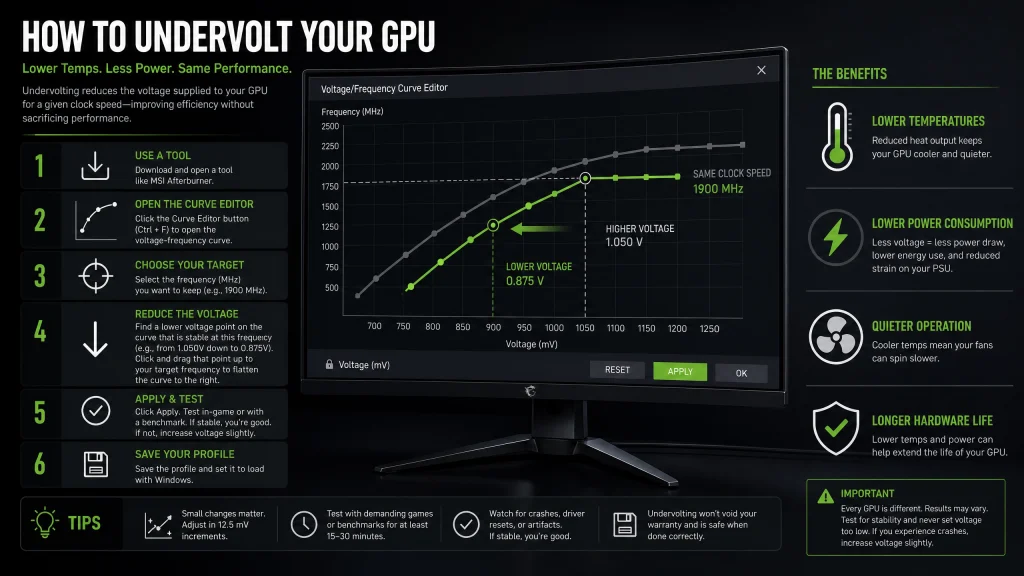
Step 3: Open the Voltage Curve Editor
In MSI Afterburner:
- Press Ctrl + F
- Open the voltage/frequency curve editor
This graph controls how the GPU behaves at different voltage levels.
Step 4: Reduce Voltage Gradually
This is the most important part of how to undervolt GPU tuning.
Start conservatively.
For example:
- Reduce voltage by 25mV
- Test stability
- Reduce further if stable
Most modern GPUs tolerate moderate undervolting extremely well.
Step 5: Lock Frequency at Lower Voltage
The goal is maintaining strong clock speeds at lower voltages.
Example:
- 2700MHz at 1.05V
- Undervolted to 2700MHz at 0.95V
This reduces:
- Heat
- Power usage
- Noise
without sacrificing noticeable gaming performance.
Step 6: Stress Test Stability
Stress testing is critical when learning how to undervolt GPU hardware.
Test stability using:
- Long gaming sessions
- 3DMark stress tests
- Blender GPU rendering
- Ray tracing workloads
Watch for:
- Driver crashes
- Artifacting
- Black screens
- System instability
If instability occurs, slightly increase voltage.
Real-World Benefits of GPU Undervolting
Many users are surprised by how effective undervolting can be.
Typical results include:
| Improvement | Average Result |
|---|---|
| Temperature Reduction | 5°C–15°C |
| Noise Reduction | Significant |
| Power Savings | 30W–100W |
| FPS Difference | Minimal |
In many cases, performance remains nearly identical.
Best GPUs for Undervolting
Some GPUs respond exceptionally well to undervolting.
Popular examples include:
- NVIDIA GeForce RTX 4090
- NVIDIA GeForce RTX 4080
- AMD Radeon RX 7900 XTX
High-end GPUs often ship with aggressive voltage settings from the factory.
This creates excellent undervolting opportunities.
Undervolting vs Overclocking
Many enthusiasts combine both techniques.
Overclocking
- Increases clock speed
- Raises power consumption
- Generates more heat
Undervolting
- Reduces voltage
- Lowers temperatures
- Improves efficiency
Modern tuning often combines:
- Mild undervolting
- Slight overclocking
to maximize efficiency.
Common Mistakes When Learning How to Undervolt GPU
Reducing Voltage Too Aggressively
Large voltage drops often cause instability.
Always adjust gradually.
Ignoring Stability Testing
Short tests are not enough.
Long gaming sessions reveal hidden instability.
Forgetting Fan Curves
Undervolting works even better with optimized cooling profiles.
How GPU Undervolting Helps Gaming Laptops
Gaming laptops benefit enormously from undervolting because they have limited cooling capacity.
Undervolting helps laptops:
- Run cooler
- Reduce thermal throttling
- Maintain boost clocks
- Extend battery life
- Reduce fan noise
For portable systems, learning how to undervolt GPU hardware is often one of the best optimizations available.
Image Examples
GPU undervolting voltage curve optimization


Suggested ALT text:
- how to undervolt GPU using MSI Afterburner
- GPU undervolting voltage curve optimization
GPU temperature reduction after undervolting


Suggested ALT text:
- how to undervolt GPU for lower temperatures
- GPU undervolt thermal performance comparison
Frequently Asked Questions
Does undervolting reduce gaming performance?
Usually very little. In many cases, performance remains nearly identical.
Can undervolting damage a GPU?
No. Undervolting is generally very safe and reduces electrical stress.
Is undervolting better than underclocking?
Yes. Undervolting maintains performance while improving efficiency.
What is the best undervolting software?
MSI Afterburner is the most popular option.
Does undervolting reduce GPU lifespan?
No. Lower temperatures and reduced voltage may actually help prolong lifespan.
Final Thoughts
Learning how to undervolt GPU hardware is one of the smartest optimizations PC enthusiasts can make in 2026. Modern graphics cards consume enormous amounts of power, and undervolting offers a highly effective way to reduce temperatures, lower noise levels, and improve efficiency without sacrificing gaming or rendering performance.
Whether you use your PC for gaming, streaming, AI acceleration, video editing, or 3D rendering, undervolting can help your GPU operate cooler, quieter, and more consistently under heavy workloads. With the right tools and careful testing, mastering how to undervolt GPU systems can dramatically improve the overall experience of owning high-performance hardware. link.site
