
Post
Apple Silicon vs NVIDIA GPUs: The Ultimate Battle for Content Creators in 2026
May
Apple Silicon vs NVIDIA GPUs: The Ultimate Battle for Content Creators
The debate surrounding Apple Silicon vs NVIDIA GPUs has become one of the most important discussions in the creative industry. Video editors, 3D artists, motion designers, photographers, and AI creators are constantly searching for the best hardware platform to maximize productivity and rendering performance.
Over the last few years, Apple completely transformed the Mac ecosystem with Apple Silicon chips, while NVIDIA continued dominating the PC market with powerful RTX graphics cards and CUDA acceleration. Both platforms offer incredible performance, but they approach computing in fundamentally different ways.
For content creators in 2026, choosing between Apple Silicon and NVIDIA GPUs is no longer simply about operating systems. It is about workflow optimization, rendering speed, software compatibility, AI acceleration, power efficiency, and long-term value.
In this detailed comparison, we will analyze Apple Silicon vs NVIDIA GPUs across video editing, 3D rendering, AI workloads, gaming, thermals, and future-proofing to help creators choose the right platform.
Understanding Apple Silicon Architecture
Apple Silicon uses a unified system-on-chip design where the CPU, GPU, Neural Engine, and memory all exist within a single package.
Unlike traditional PCs, Apple Silicon relies on:
- Unified memory architecture
- Integrated GPU acceleration
- Extremely high memory bandwidth
- Dedicated AI processing engines
- Hardware media encoders
This architecture allows Apple devices to achieve impressive efficiency while consuming significantly less power than traditional desktop workstations.
Popular Apple Silicon chips include:
- Apple M3
- Apple M3 Pro
- Apple M3 Max
- Apple M4 Ultra
These processors are optimized heavily for creative workflows such as:
- Final Cut Pro
- Logic Pro
- DaVinci Resolve
- Adobe Premiere Pro
- Photo editing applications
Understanding NVIDIA GPU Architecture
NVIDIA GPUs use a dedicated graphics processing design built for maximum parallel computing performance.
Modern RTX graphics cards feature:
- Dedicated VRAM
- CUDA cores
- Tensor AI cores
- Ray tracing hardware
- Advanced cooling systems
Unlike Apple Silicon, NVIDIA GPUs are separate components connected through PCIe interfaces.
Popular creator-focused GPUs include:
- NVIDIA GeForce RTX 5090
- NVIDIA GeForce RTX 5080
- NVIDIA RTX 6000 Ada
NVIDIA dominates professional GPU acceleration because CUDA remains the industry standard for:
- Blender rendering
- AI model training
- 3D simulations
- GPU compute workloads
- Scientific applications


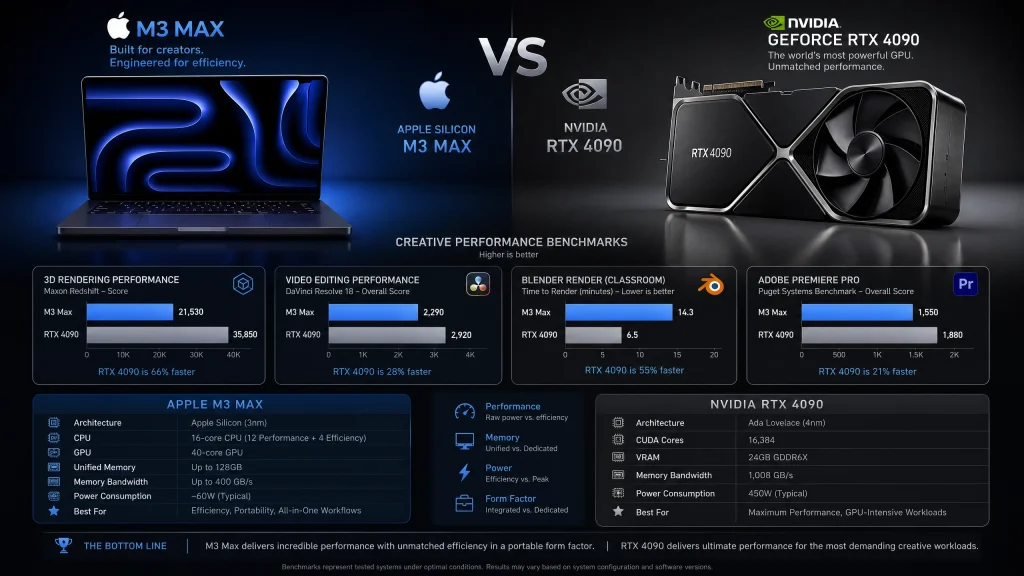
Apple Silicon vs NVIDIA GPUs for Video Editing
Video editing is one of the biggest battlegrounds in the Apple Silicon vs NVIDIA GPUs debate.
Apple Silicon Advantages
Apple Silicon performs exceptionally well in video editing thanks to:
- Dedicated ProRes engines
- Unified memory
- Excellent battery efficiency
- Optimized macOS applications
- Silent thermal performance
Applications like Final Cut Pro are heavily optimized for Apple hardware, allowing even portable MacBooks to edit 4K and 8K footage smoothly.
NVIDIA Advantages
NVIDIA GPUs excel in:
- GPU-heavy effects
- RAW video processing
- AI-assisted editing
- Multi-layer timelines
- Real-time rendering
Adobe Premiere Pro and DaVinci Resolve often perform better with high-end NVIDIA GPUs because these applications leverage CUDA acceleration extensively.
Which Is Better?
For portable editing and efficiency, Apple Silicon is excellent.
For maximum rendering power and large-scale production workflows, NVIDIA still leads.
Apple Silicon vs NVIDIA GPUs for 3D Rendering
When comparing Apple Silicon vs NVIDIA GPUs for 3D rendering, NVIDIA maintains a major advantage.
NVIDIA Strengths
- CUDA acceleration
- OptiX rendering support
- Blender optimization
- Superior ray tracing
- Faster GPU rendering
3D applications such as Blender, OctaneRender, V-Ray, and Redshift are heavily optimized for NVIDIA hardware.
Apple Silicon Limitations
- Limited support for CUDA-exclusive software
- Smaller ecosystem for professional rendering
- Fewer GPU rendering optimizations
Although Apple Silicon has improved significantly in GPU rendering, NVIDIA still dominates high-end 3D workflows.
AI and Machine Learning Performance
AI acceleration is becoming increasingly important for creators.
Modern workloads include:
- AI image generation
- Video upscaling
- Voice synthesis
- Machine learning models
- Generative AI tools
NVIDIA Leadership in AI
NVIDIA remains the leader because:
- CUDA dominates AI frameworks
- Tensor cores accelerate AI tasks
- Broad support across software ecosystems
- Better compatibility with machine learning libraries
Most AI tools are optimized first for NVIDIA GPUs.
Apple Silicon AI Advantages
Apple Silicon includes dedicated Neural Engines that perform well in:
- On-device AI tasks
- Photo enhancement
- Real-time transcription
- AI-assisted editing
However, large-scale AI training still heavily favors NVIDIA.
Gaming Performance Comparison
Gaming is another major factor in the Apple Silicon vs NVIDIA GPUs comparison.
NVIDIA Gaming Advantages
- Superior ray tracing
- DLSS AI upscaling
- Massive game compatibility
- Better VR support
- Higher raw gaming performance
Apple Gaming Limitations
- Smaller game library
- Limited DirectX support
- Fewer optimized AAA titles
- Reduced VR compatibility
Although gaming on Mac has improved, NVIDIA-powered PCs remain significantly better for gaming enthusiasts.


Power Efficiency and Thermals
One area where Apple Silicon dominates is efficiency.
Apple Silicon Benefits
- Lower power consumption
- Minimal fan noise
- Exceptional battery life
- Cooler operating temperatures
MacBooks powered by Apple Silicon can deliver workstation-level editing performance while maintaining impressive battery life.
NVIDIA Workstation Challenges
- Higher power requirements
- Larger cooling systems
- Increased heat output
- Greater electricity consumption
Desktop NVIDIA workstations often consume several hundred watts under heavy rendering loads.
Software Compatibility
Software optimization matters just as much as hardware.
Best Software for Apple Silicon
- Final Cut Pro
- Logic Pro
- Pixelmator Pro
- Motion
- Native macOS creative apps
Best Software for NVIDIA GPUs
- Blender
- Unreal Engine
- Adobe After Effects
- OctaneRender
- Stable Diffusion
The best platform often depends entirely on your workflow.
Upgradeability and Long-Term Value
Apple Silicon Systems
- Limited hardware upgrades
- Integrated memory design
- Excellent long-term efficiency
- Strong resale value
NVIDIA PC Systems
- Fully upgradeable GPUs
- Flexible configurations
- Easier future expansion
- Better component customization
PC workstations offer significantly greater hardware flexibility over time.
Who Should Choose Apple Silicon?
Apple Silicon is ideal for:
- Video editors
- Mobile creators
- Photographers
- Music producers
- Users prioritizing efficiency
MacBooks provide outstanding portability and battery life for creators constantly working on the move.
Who Should Choose NVIDIA GPUs?
NVIDIA GPUs are best for:
- 3D artists
- AI developers
- High-end video production
- Professional rendering
- Hardcore gamers
If your workflow depends heavily on GPU acceleration, NVIDIA remains difficult to beat.
Final Verdict on Apple Silicon vs NVIDIA GPUs
The Apple Silicon vs NVIDIA GPUs battle ultimately depends on your creative workflow.
Apple Silicon excels in:
- Efficiency
- Portability
- Battery life
- Optimized video editing
- Silent operation
NVIDIA GPUs dominate in:
- 3D rendering
- AI workloads
- Gaming
- CUDA acceleration
- Professional GPU compute tasks
For mobile content creators and editors, Apple Silicon delivers an incredibly polished experience with exceptional efficiency. However, for creators requiring maximum rendering power, AI acceleration, and professional GPU performance, NVIDIA remains the industry leader in 2026.
Choosing the right platform is less about which technology is universally better and more about selecting the hardware ecosystem that best matches your creative workflow, software stack, and long-term professional goals. link.site
