
Post
GPU How to Choose a PSU for Your Gaming PC: Full Buying Guide 2024
May
## How to Choose a PSU for Your Gaming PC: Full Buying Guide 2024 GPU
The power supply unit (PSU) is the most overlooked component in a gaming PC build. While enthusiasts debate GPU performance and chase the latest CPU benchmarks, the humble PSU quietly powers every single component in your system and protects them from electrical damage. A poor-quality PSU with unstable voltage output can cause random system crashes, reduce component lifespan, and in extreme cases cause catastrophic failure that takes other expensive hardware with it.
This comprehensive buying guide walks you through every step of selecting the right PSU for your 2024 gaming build — from calculating the wattage you actually need to decoding efficiency ratings and picking the best unit for your budget.
—
### Why PSU Quality Matters More Than You Think
Most PC builders instinctively spend heavily on GPU, CPU, and RAM, then look for a cheap PSU to save money. This is a false economy. Here is why:
**Voltage Stability:** A quality PSU maintains output voltages within ±3% of specification (12V, 5V, 3.3V rails) across all load conditions. Budget PSUs often allow 5–8% voltage droop under heavy load — this translates directly to system instability, random restarts during gaming, and accelerated component wear over time.
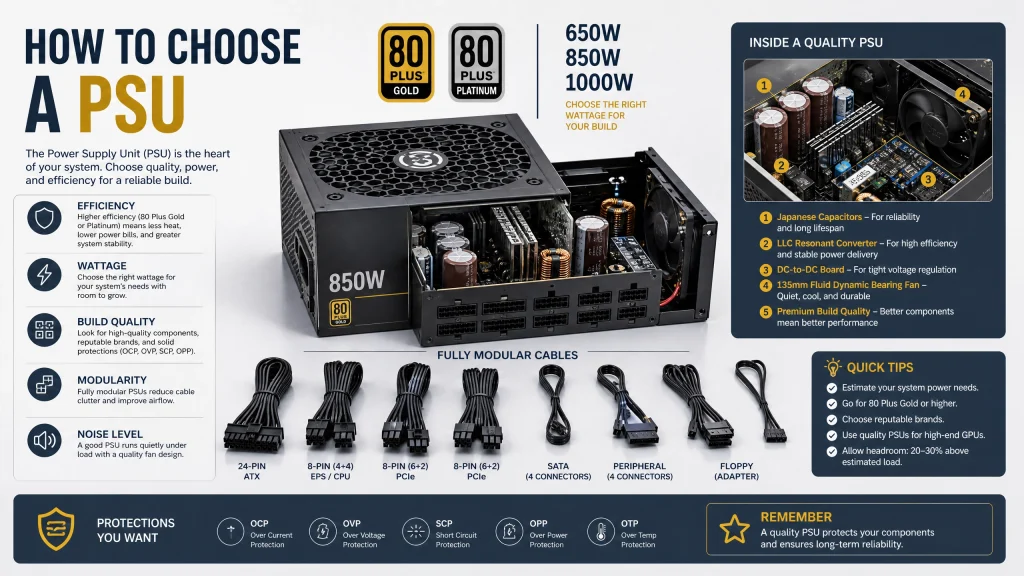
**Protection Circuits:** Quality PSUs include multiple hardware protection mechanisms:
– OVP (Over Voltage Protection) — shuts down before excessive voltage damages connected hardware
– OCP (Over Current Protection) — limits current per rail to prevent wiring damage
– SCP (Short Circuit Protection) — immediate shutdown on short circuit detection
– OTP (Over Temperature Protection) — thermal shutdown before internal damage occurs
– UVP (Under Voltage Protection) — shuts down when input voltage drops critically low
Budget PSUs frequently omit or implement these protections inadequately, leaving your $400 GPU and $300 CPU unprotected against electrical faults.
**Fan and Noise:** Premium PSUs include high-quality 120mm or 135mm double ball-bearing fans with advanced control curves. Cheap PSUs use sleeve-bearing fans that become noisy and fail within 2–3 years of use.
—
### Step 1: Calculate Your Required Wattage
Start by estimating total system power consumption from your component TDP ratings.
**Example — Mid-Range Gaming Build:**
| Component | Power Draw |
|—|—|
| NVIDIA RTX 4070 Super (TDP) | 220W |
| Intel i5-14600K (PL2) | 181W |
| Z790 Motherboard | ~40W |
| 32GB DDR5-5600 (2x16GB) | ~10W |
| 2x NVMe PCIe 4.0 SSD | ~10W |
| 4x Case fans (120mm) | ~12W |
| CPU AIO cooler pump | ~5W |
| **Total estimated peak** | **~478W** |
**Apply 20–25% headroom:**
478W × 1.25 = **597W** → Select a **650W PSU**
This headroom serves two purposes: it ensures the PSU does not operate constantly at maximum load (which reduces efficiency and lifespan), and it provides room for power spikes during GPU and CPU simultaneous burst workloads.
**General Wattage Recommendations for 2024 Builds:**
| GPU | CPU | Minimum PSU | Recommended PSU |
|—|—|—|—|
| RTX 4060 / RX 7600 | Any mid-range | 500W | 550W |
| RTX 4070 / RX 7800 XT | i5-14600K | 600W | 650W |
| RTX 4070 Super | i5-14600K / i7-14700K | 650W | 750W |
| RTX 4080 / RX 7900 XTX | i7-14700K | 750W | 850W |
| RTX 4090 | i9-14900K / R9 7950X | 900W | 1000W |
Use the **PCPartPicker System Builder** wattage estimator for a build-specific calculation that accounts for your exact component list.
**Important note about RTX 4090:** This card has a peak power spike behavior — measured spikes of up to 600W in less than 100 microseconds during gameplay in titles like Cyberpunk 2077. A 1000W PSU is strongly recommended, and a 1200W unit provides additional safety margin.
—
### Step 2: Understanding 80 Plus Efficiency Ratings
80 Plus is an independent certification that measures how efficiently a PSU converts AC wall power to DC component power. Inefficiency manifests as waste heat inside the PSU housing.
| Rating | Efficiency at 20% Load | Efficiency at 50% Load | Efficiency at 100% Load |
|—|—|—|—|
| 80 Plus | 80% | 80% | 80% |
| 80 Plus Bronze | 82% | 85% | 82% |
| 80 Plus Silver | 85% | 88% | 85% |
| 80 Plus Gold | 87% | 90% | 87% |
| 80 Plus Platinum | 90% | 92% | 89% |
| 80 Plus Titanium | 90% | 94% | 91% |
**Practical Impact Example:**
A gaming system drawing 400W at peak:
– 80 Plus Bronze PSU: pulls ~471W from wall (efficiency 85%)
– 80 Plus Gold PSU: pulls ~444W from wall (efficiency 90%)
– 80 Plus Platinum PSU: pulls ~435W from wall (efficiency 92%)
The Gold-to-Platinum difference saves ~9W continuously — worth ~$6–$10/year in electricity depending on your rate. The Bronze-to-Gold difference saves ~27W — worth ~$20–$30/year.
**Recommendation:** Always choose at least **80 Plus Gold** for a gaming build. The incremental cost over Bronze is typically $15–$25 and pays back in electricity savings within one to two years while also running cooler and quieter.
—
### Step 3: Modular vs Semi-Modular vs Non-Modular
**Non-Modular:**
Every cable is permanently soldered to the PSU. Unused cables must be bundled and zip-tied inside the case, reducing airflow and making the interior look untidy. Generally the cheapest option per watt. Best for: large full-tower cases with ample cable management space and strict budget constraints.
**Semi-Modular:**
The essential cables that every build needs — 24-pin ATX motherboard connector and 4+4-pin EPS CPU power — are permanently attached. All other cables (PCIe GPU power, SATA, Molex, peripheral) are detachable. This is the most practical format for the majority of mid-range builds: you get clean cable management without the full cost of a fully modular unit.
**Fully Modular:**
Every cable is removable. You only connect the cables your specific build requires — nothing more. The result is the cleanest possible interior and optimal airflow. Full modularity typically adds $20–$40 to the cost of an equivalent semi-modular PSU. Best for: showcase builds, small form factor cases where cable density is critical, and builders who prioritize aesthetics.
—
### Step 4: PCIe Connector Requirements by GPU
Modern GPUs have specific PSU connector requirements that must be met:
| GPU | PCIe Power Connectors Required |
|—|—|
| RTX 4060 Ti | 1x 16-pin (12VHPWR) or 2x 8-pin |
| RTX 4070 Super | 1x 16-pin (12VHPWR) or 2x 8-pin |
| RTX 4080 Super | 1x 16-pin (12VHPWR) or 3x 8-pin |
| RTX 4090 | 1x 16-pin 12VHPWR (native preferred) |
| RX 7800 XT | 2x 8-pin |
| RX 7900 XTX | 2x 8-pin + 1x 6-pin |
For RTX 4000-series cards, NVIDIA provides a 16-pin adapter that connects to existing 8-pin connectors. This works, but a PSU with a native 16-pin 12VHPWR connector eliminates the adapter entirely and is recommended for RTX 4080 and RTX 4090 builds.
—
### Top PSU Recommendations for 2024
**650W — Mainstream Gaming (RTX 4070 / RTX 4070 Super builds)**
**Seasonic Focus GX-650 (80 Plus Gold, Fully Modular)**
– Price: $100 – $120 | Warranty: 10 years
– One of the most tested and trusted PSU models available
– Tight voltage regulation across all load conditions
– Whisper-quiet fan that stops entirely below 30% load
**Corsair RM750x (80 Plus Gold, Fully Modular)**
– Price: $120 – $140 | Warranty: 10 years
– Zero RPM fan mode below ~40% load — silent at desktop idle
– Corsair’s premium line with Japanese capacitors throughout
– Excellent compatibility with Corsair iCUE ecosystem
**850W — High-End Gaming (RTX 4080 / RX 7900 XTX builds)**
**be quiet! Straight Power 12 850W (80 Plus Gold, Fully Modular)**
– Price: $140 – $165 | Warranty: 10 years
– Among the quietest PSUs ever independently tested
– Premium German engineering with superior cable quality
– Strong performance in voltage regulation under transient loads
**ASUS ROG Thor 850P2 (80 Plus Platinum, Fully Modular)**
– Price: $180 – $220 | Warranty: 10 years
– Integrated OLED display showing real-time watt consumption
– Aura Sync RGB for build lighting integration
– Premium showcase component for high-visibility builds
**1000W+ — Enthusiast and RTX 4090 Builds**
**Seasonic Prime TX-1000 (80 Plus Titanium, Fully Modular)**
– Price: $230 – $280 | Warranty: 12 years
– Flagship Seasonic unit — industry reference for quality
– 94% efficiency at 50% load
– Native 16-pin 12VHPWR connector included
**Corsair HX1000i (80 Plus Platinum, Fully Modular)**
– Price: $200 – $240 | Warranty: 10 years
– Digital monitoring via Corsair Link software
– Precise per-rail current monitoring
– Strong RTX 4090 power delivery characteristics
—
### PSU Brands to Avoid and Reliability Notes
Certain brands appear regularly in failure reports and independent teardown reviews. Avoid units from unverified brands without third-party lab testing, and be cautious with heavily discounted units that undercut the market by 40%+.
**Reliable brands supported by independent testing (JonnyGuru, Tom’s Hardware, Cybenetics lab):**
Seasonic, Corsair (RM/HX/SF series), be quiet!, EVGA SuperNOVA (discontinued but still excellent used), Fractal Design ION, and Super Flower (OEM for several premium brands).
**Warranty as a reliability indicator:**
– 2–3 years: Entry-level, adequate for basic builds
– 5 years: Mid-range — acceptable
– 7 years: Good — shows manufacturer confidence
– 10–12 years: Premium — the gold standard in consumer PSUs
—
### Common PSU Buying Mistakes
1. **Buying by brand name alone**: The same brand makes both good and bad PSUs across different product lines. Always check the specific model’s test reviews.
2. **Ignoring transient load performance**: Some PSUs measure well under steady-state testing but sag badly during rapid load spikes — exactly what happens when your GPU hits maximum draw during an explosion-heavy game scene.
3. **Extreme oversizing**: Running a 1000W PSU in a 300W system is wasteful — PSUs are least efficient at very low loads (under 20%).
4. **Skipping the 80 Plus check**: An unbranded 650W unit might be 70% efficient — pulling 930W from the wall to deliver 650W to your components and generating significant heat in the process.
—
### Final PSU Recommendation Matrix
| Build Goal | GPU | Recommended PSU |
|—|—|—|
| Budget 1080p gaming | RTX 4060 | Seasonic Focus GX-550 |
| Mid-range 1440p | RTX 4070 Super | Seasonic Focus GX-650 or Corsair RM750x |
| High-end 1440p/4K | RTX 4080 Super | be quiet! Straight Power 12 850W |
| Enthusiast 4K / RTX 4090 | RTX 4090 | Seasonic Prime TX-1000 or Corsair HX1000i |
Never compromise on your PSU. It is the single component that touches every other part in your build, and the reliability difference between a $80 generic unit and a $120 Seasonic Focus GX is measurable, documented, and worth every dollar of the premium.link.site
